



How do you find your repeat questions?
Do not guess. Open your last 20 guest conversations and tag each question by topic. In general practice a small group of topics accounts for most of the volume, and the list is specific to your property: a villa with a pool gets pool questions, a city apartment gets lock questions.
- Export or scroll through the last 20 conversations.
- Write each question on a line and group by topic (access, Wi-Fi, climate, kitchen, rules, local, checkout).
- Count how many conversations each topic appears in.
- For the top five, write the shortest answer that would have prevented the message.
- Decide where that answer should live, using the table below.
- Repeat in a month and see what moved.
Where should each answer live?
Different questions come up at different moments, so the same answer belongs in more than one place, written once and reused.
| Question | Before arrival | At the property | Best place |
|---|---|---|---|
| How do we get in? | Check-in message and listing | Gate and door photo | Message (timed) plus phone page |
| What is the Wi-Fi password? | Pre-arrival message | TV and QR card | TV with Wi-Fi QR |
| How does the air conditioning or heating work? | House manual | Label on the remote | Phone page or TV house info |
| Where do we park? | Directions in the message | Sign at the gate | Pre-arrival message |
| How do I use the TV, Netflix or YouTube? | Not needed | TV home screen | TV itself |
| Can we have visitors or use the pool at night? | House rules in listing | Rules on TV | Rules in listing and TV |
| Where is the nearest pharmacy, supermarket, restaurant? | Guidebook link | Local guide on TV | Guidebook, TV or assistant |
| Can we check out late? | Checkout message | Checkout card | Checkout message |
| Something odd that you did not cover | Not applicable | Message the host | Assistant forwards to you |
Adapt to your property. A guest who cannot get in needs a person, so keep a phone number prominent.
What belongs in the listing and the messages?
The listing is for questions that decide whether to book: guest numbers, rules, amenities, location, check-in and checkout times. Anything the guest should know before booking (no pets, stairs, no air conditioning in the bedrooms) saves you a cancelled stay.
Messages are for time-sensitive logistics: arrival details a day or two before, codes on the day, checkout steps the evening before. Airbnb's Help Center says detailed check-in instructions are shown to guests 48 hours before check-in, so use your pre-arrival message for anything earlier.
What belongs in a guidebook, on the TV and on the phone?
A guidebook or house manual is for how things work. Airbnb separates its host guidebook (local recommendations) from a house manual (how the home's features work), so you may want both. Write short entries with the answer first and a photo of the control panel or switch.
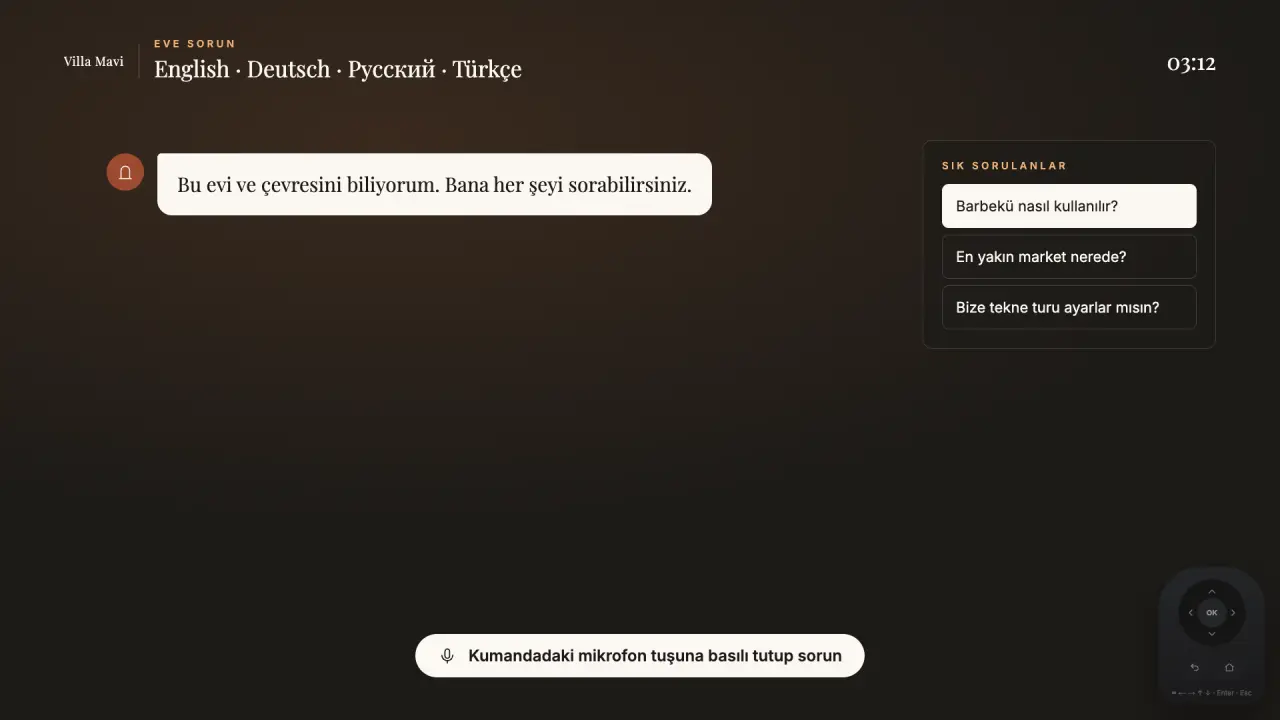
The TV is the one screen every guest looks at: Wi-Fi, house info, rules, local tips and checkout belong there. The phone page, opened by QR code, is for when the guest is away from the TV: at the oven, on the terrace, on the way to the beach. With Welcomo the TV greets the guest by name in their language and the QR code opens a private phone page, active from booking to check-out.
How should you handle the long tail with an assistant?
Beyond the top ten there are hundreds of one-off questions: "Is there a hairdryer?" "Can we get a baby cot?" An AI assistant helps if it only answers from your information and does not guess. Welcomo's assistant answers from what you have put in the panel and forwards what it cannot answer to you, so a missing answer becomes a note for you rather than an invented one.
Treat those forwarded questions as a to-do list. Each time one arrives, add the answer to the panel; the next guest will not need to ask.
A short checklist for quieter inboxes
Run through this once a quarter.
- Top five questions identified and answered in writing
- Wi-Fi, TV, climate and checkout visible without searching
- Pre-arrival message sent with directions and parking
- Rules short, friendly and in the listing
- Guide updated after every question you answered by hand
- Phone number and message option easy to find for emergencies
What does one answer look like across the five places?
Take the question "How do we turn on the hot water?" in a villa with a solar boiler and an electric backup. The answer is the same everywhere; the shape changes.
| Place | How it appears |
|---|---|
| Listing | "Hot water: solar with electric backup, always available. First shower may need a minute." Sets expectations before booking. |
| Pre-arrival message | One line: "Hot water is on and ready; switch is in the utility cupboard if needed." |
| Printed card | A photo of the cupboard with an arrow to the switch, kept next to the boiler |
| Phone page and TV house info | The same photo and two sentences, reachable by search or menu |
| Assistant | Answers the question in the guest's language from the same two sentences, or forwards it to you if the answer is missing |
Which questions cannot be answered in advance?
Some questions do not repeat, and that is fine. Others look one-off but come back in disguise, and a few should always reach a person.
- Anything urgent or safety related: no heat, no water, a gas smell, a locked-out guest. Always give a phone number
- Requests that change the booking: early check-in, late checkout, extra guests. Keep a standard answer and the conditions
- Complaints and refund questions: these need a human, with a quick and calm reply
- Local questions that depend on the day, such as whether a restaurant is open. Offer the number or the map link rather than a guess
- Questions in another language: a translated answer from your guide is often enough; save the original wording for replies that matter
What are the common mistakes?
These habits keep the same questions coming back.
- Answering by message and never writing the answer into the guide
- Putting the answer in the guidebook but never telling the guest where to find it
- Different answers in the listing, the message and the house guide
- Hiding the answer in a long paragraph rather than a line and a photo
- Writing for the guest you wish you had instead of the one who asks
- Never reviewing: the top questions change with the season and the guests
- Making it hard to contact you, so guests ask in the review instead
How do you know it is working?
Count the messages per stay before and after a change. You do not need a dashboard: a tally on a sheet of paper for a month is enough. If a topic still appears often, the answer is in the wrong place or too hard to find, and the fix is to move it or shorten it rather than to write more. With Welcomo, questions the assistant forwards to you show you exactly which answers are missing from your panel, so each one is a prompt to add a line.
Frequently asked
Which questions do guests ask most?
In general practice they are access, Wi-Fi, heating or cooling, parking, TV use and checkout. Your own conversations are the best guide, so tag your last 20.
Will fewer messages hurt my host rating?
Not if guests find answers quickly. Keep a visible way to reach you for anything urgent or unusual.
Does an AI assistant replace me?
No. Welcomo's assistant answers from the information you provide and forwards what it cannot answer, so you stay in the loop.
Where should the Wi-Fi password go?
In your pre-arrival message and on the TV at arrival. A QR code is quicker than typing; you can make one with a free Wi-Fi QR code tool.
Sources
- Airbnb Help Center: Check-in instructions for guests · retrieved November 16, 2026
- Airbnb Help Center: What's a guidebook? · retrieved November 16, 2026